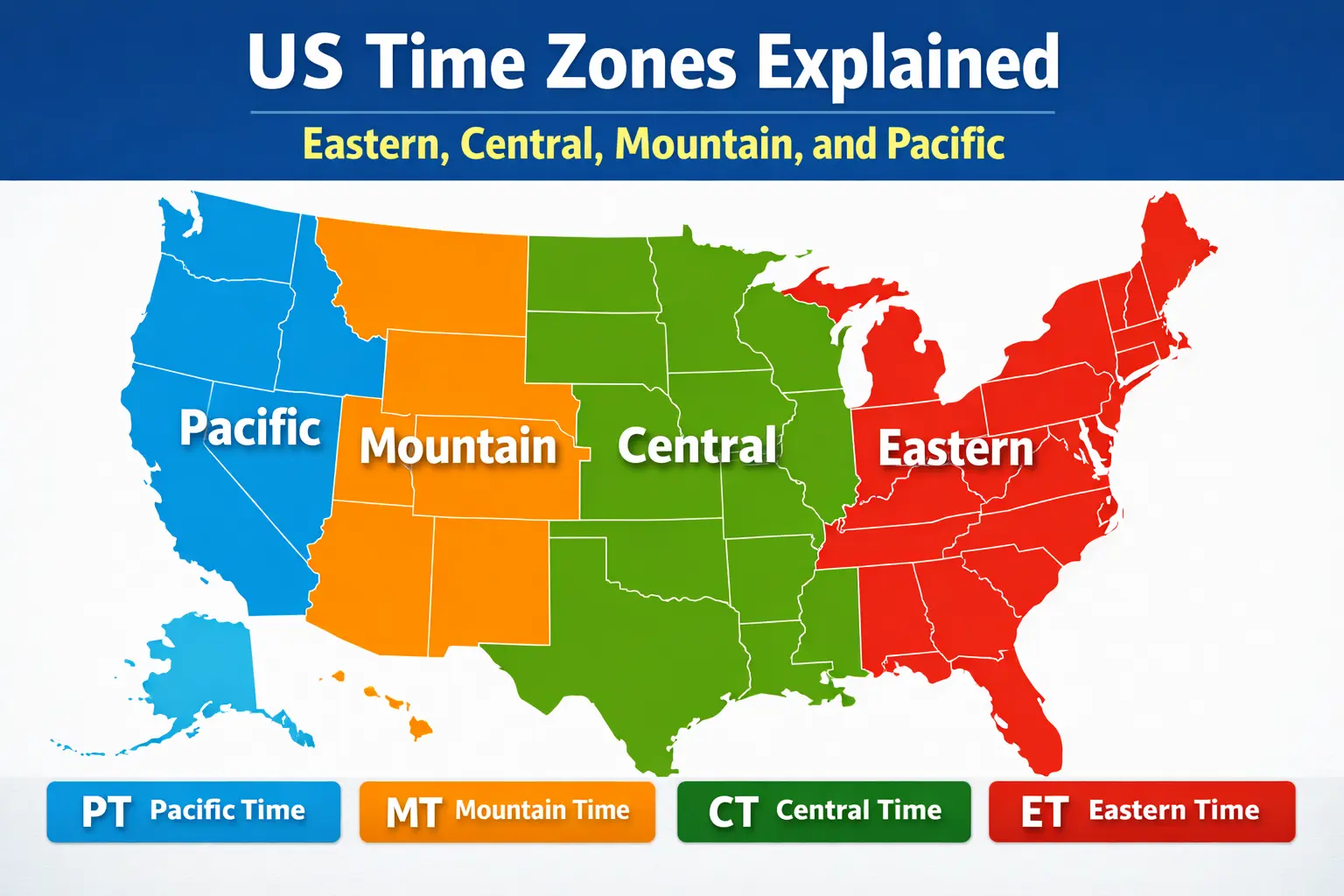
US Time Zones Explained
The United States spans multiple time zones, so the local time in New York is not the same as the local time in California. Most people deal with four main zones in the contiguous states: Eastern, Central, Mountain, and Pacific. Alaska and Hawaii use their own zones, and a few US territories have additional offsets.
This matters for travel, business calls, live sports, trading hours, and even simple things like “what time should I text someone?” If you remember one rule, remember this: as you move west, the time gets earlier.
The 4 main US time zones
Eastern Time (ET)
Eastern Time is used by many of the most populated areas in the US and is often the default for national schedules. Examples include New York, Florida, Georgia, and Pennsylvania.
Central Time (CT)
Central Time is one hour behind Eastern. You’ll see it in states like Texas, Illinois, Louisiana, and Tennessee.
Mountain Time (MT)
Mountain Time is one hour behind Central. It includes states such as Colorado, Utah, New Mexico, and Montana.
Pacific Time (PT)
Pacific Time is one hour behind Mountain and three hours behind Eastern. Examples include California, Washington, Oregon, and Nevada.
Quick conversion cheatsheet
- ET to CT: subtract 1 hour
- ET to MT: subtract 2 hours
- ET to PT: subtract 3 hours
- CT to MT: subtract 1 hour
- CT to PT: subtract 2 hours
- MT to PT: subtract 1 hour
If you are converting the other direction (from west to east), add hours instead of subtracting.
Why some states can be tricky
A “state time zone” sounds simple, but a few states cover more than one zone depending on the region. Also, daylight saving time (DST) rules change the clock for part of the year, which is why an app can be right in February and wrong in July if it’s not handling DST correctly.
When you need the exact time for a specific place, it’s better to use a real time zone name (like America/New_York or America/Los_Angeles) rather than a generic offset. USinTimes uses time zone identifiers so the clock stays correct when DST starts or ends.
How to use USinTimes for time zones
- Visit the homepage to see your detected local time.
- Search for a state (for example, “California” or “NY”).
- Use the state page URL for sharing or bookmarking, like California time.
If you need a developer-friendly response, use the JSON API and you’ll get an ISO timestamp along with 12-hour and 24-hour formats.